
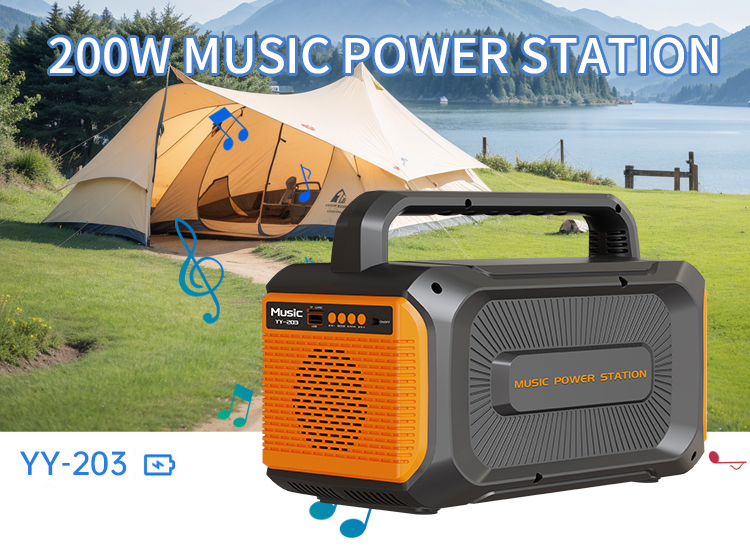
User Manual
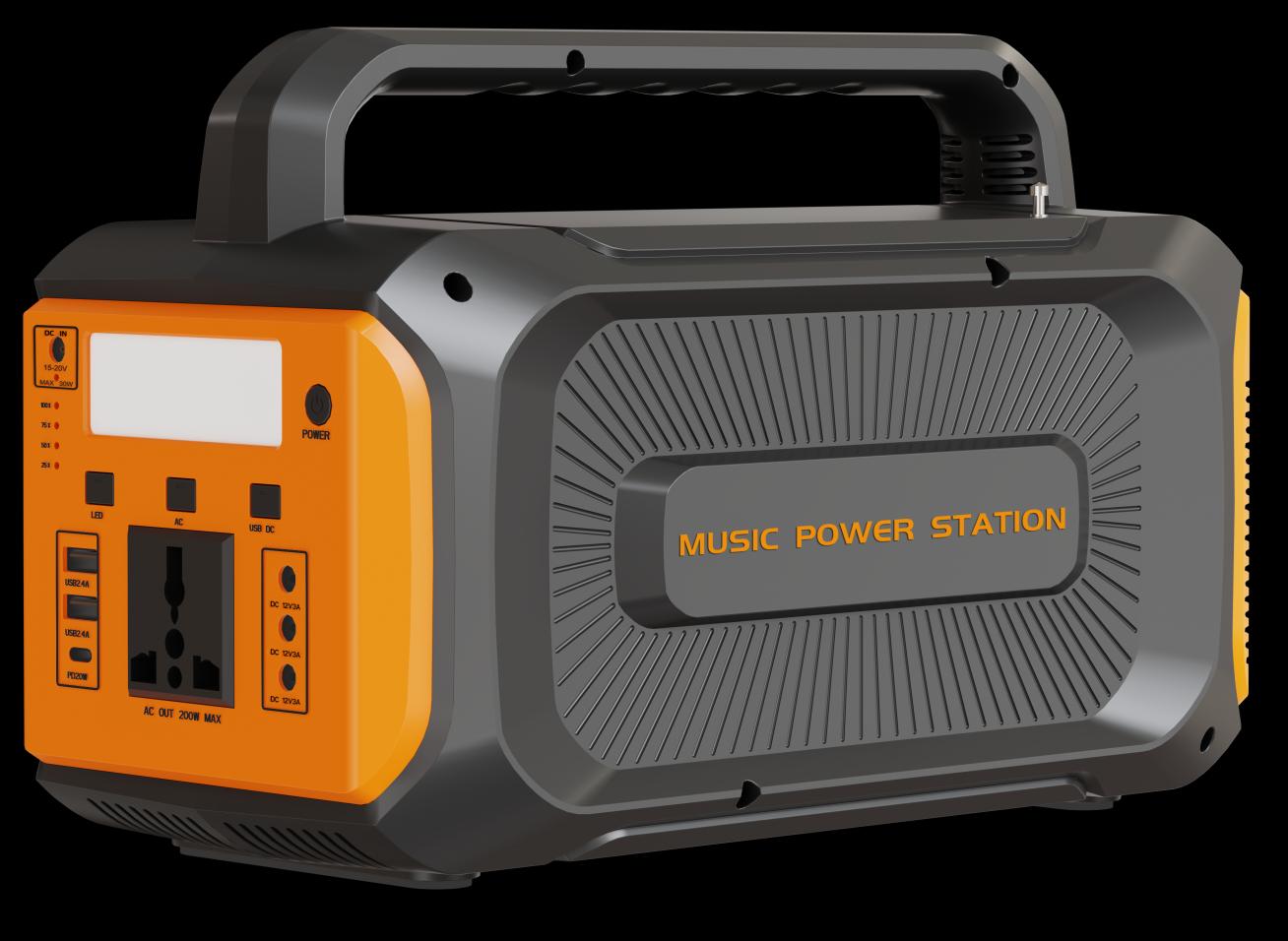
YY-203 Portable Audio Power Station
200W Music Power Station with Built-in Bluetooth Speaker · Outdoor Camping Power Bank
Precautions for Use
- Open the package and check whether the following accessories are complete: 1× Portable Audio Power Station, 1× Charger, 1× User Manual. Please check carefully whether the device is damaged during transportation. If you find that the device is damaged or parts are missing, please do not start the device, and immediately notify the carrier and dealer.
- The device should be placed in a well-ventilated place away from water, flammable gases and corrosive substances.
- Do not place it on its side. Keep the bottom and panel of the device uncovered.
- The working environment temperature should be kept between 0°C ~ 40°C.
- If the device is disassembled and used at low temperature, water condensation may occur. It must be used only after the inside and outside of the device are completely dry, otherwise there will be a danger of electric shock.
Safety Precautions
- The device has high-voltage AC output, which is potentially dangerous. It must be handled with care and kept away from children, otherwise there will be a risk of electric shock.
- Do not connect the inverter of the device to the AC circuit, otherwise even if the switch of the device is turned off, the inverter may be damaged.
- Please ensure that the power used by the electrical appliance is less than the rated output power of the device.
- Before the load is connected to the device, be sure to turn off the load switch before connecting it, and then turn on the load switch for use.
- Insert the charging terminal of the solar panel or charger into the charging port of the device for charging.
- It is prohibited to connect half-wave loads (hair dryer, electric heating wire heater), high-power motors, laser printers, or high-power rectifier loads. The device will be automatically protected because of the excessive starting power during operation.
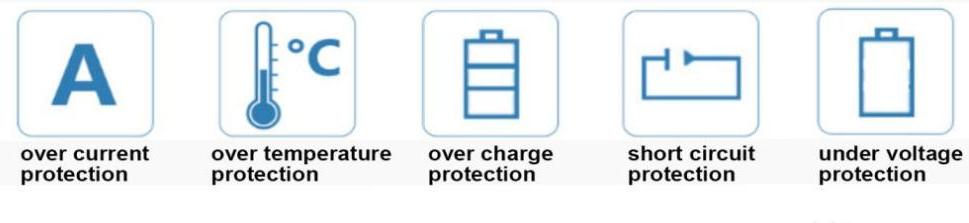
Protection Functions
The device is equipped with multiple intelligent protection functions:
Application Scenarios

Use Load Types
AC fans, DC fans, AC LED lights, DC LED lights, digital products, mobile phones, desktop computers, notebook computers, etc.
Product Overview
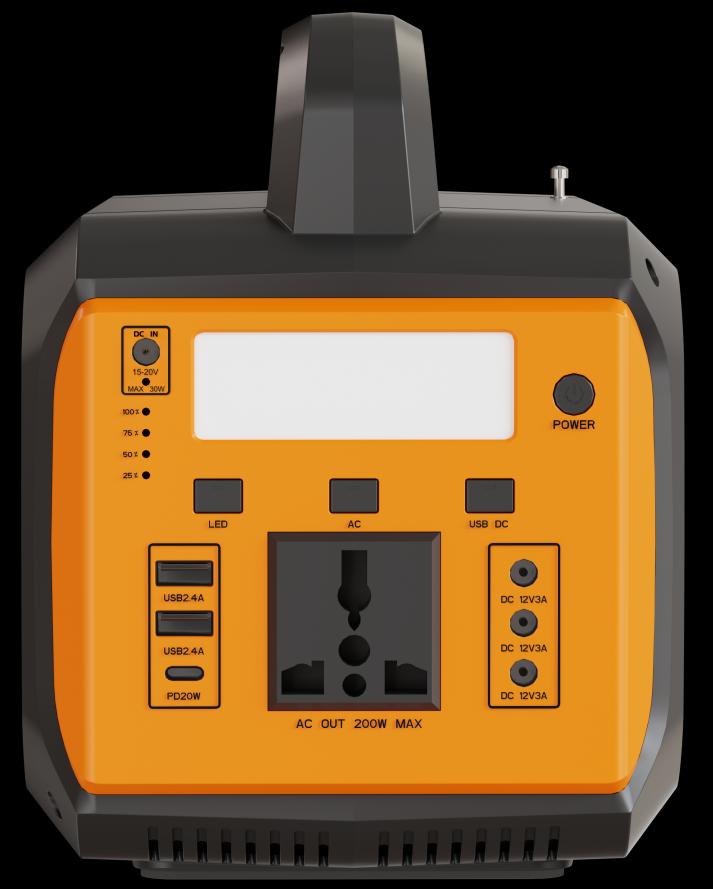
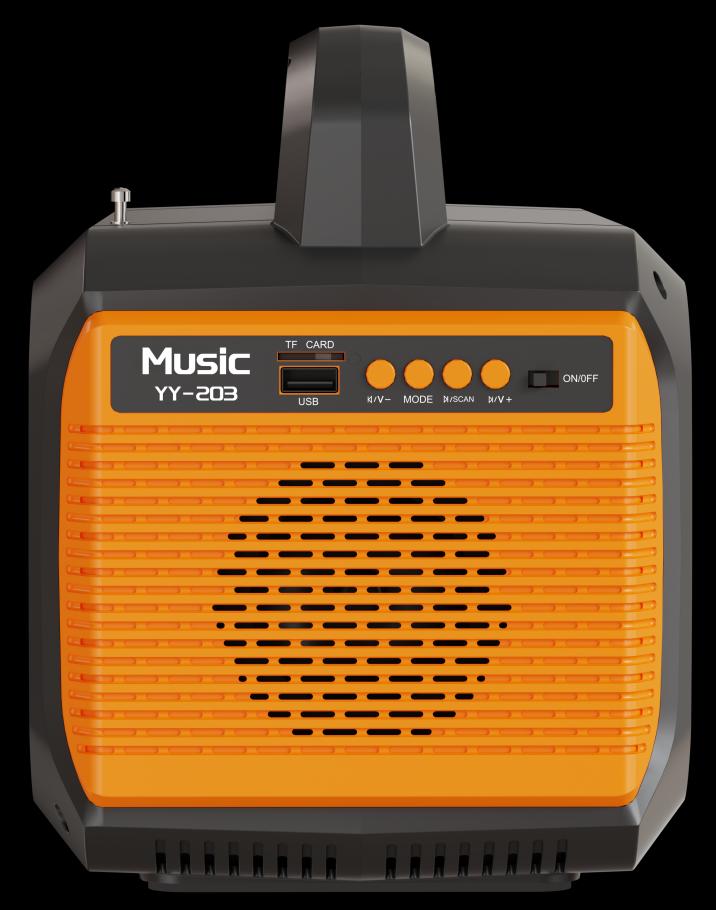
Control Panel
- Handle
- LED Light
- Charging Port
- Power Switch
- Charging Indicator
- AC Output Switch
- Battery Indicator
- DC Output Switch
- LED Switch
Outputs & Audio
- DC OutputDC 12V 3A × 3
- USB OutputUSB 5V 2.4A × 2 · PD 20W × 1
- AC OutputUniversal socket
- Button ①Previous song / channel / volume down
- Button ②Mode switching (USB/TF/FM/BT)
- Button ③Search / Play / Pause
- Button ④Next song / channel / volume up
- ON/OFF SwitchSpeaker power
- TF Card & USBAudio source interface
Operation Method
Power On
- Press and hold the power switch for about 3 seconds, and release it after the power indicator lights up to enter the power-on state. At this time, click the corresponding function switch on the panel to get the corresponding output. When each function is turned on, the corresponding indicator light will also light up. When using the speaker, you need to turn the ON/OFF switch to the ON position.
- To protect the battery’s service life, when the machine automatically shuts down due to low battery voltage, holding down the power switch for a long time will also prevent it from turning on. It is necessary to connect a solar panel or charger to charge the machine. After that, press and hold the main power switch for 3 seconds to turn it on.
Power Off
- When not charging, press and hold the power switch for about 3 seconds, and release it after the battery indicator goes out to shut down.
- When charging, the battery indicator will not go out. Press and hold the power switch for about 3 seconds. When the indicator lights of all functions go out, it indicates that the device is turned off.
- The machine has DC under-voltage and over-voltage protection functions. When the battery is under-voltage or over-voltage, the machine will automatically shut down.
Charge
When the solar panel or charger is connected to the charging port, the battery indicator light flashes alternately, indicating that it is in the charging state.
Function Buttons
- In the power-on state, click the DC Output / AC Output / LED Switch to turn on or off the corresponding function.
- When the DC 12V 3A output is overloaded or short-circuited, each DC output port has no output, and the DC output switch will be automatically turned off. At this time, you need to remove the load and click the DC output switch twice to turn on the output.
- When the USB 2.4A output is overloaded or short-circuited, the USB 2.4A port has no output, which does not affect other DC outputs and the DC output switch. The output can be restored after the load returns to normal.
- When the PD 20W output is overloaded or short-circuited, the PD 20W port has no output, which does not affect other DC outputs and the DC output switch. The output can be restored after the load returns to normal.
- When the AC output is overloaded or short-circuited, the AC port has no output, the AC output switch is not affected, and the output can be restored after the load is normal.
- Click the LED switch to switch the LED light. The LED light cycles through 4 states: 100% brightness → 50% brightness → SOS flashing → off.
Audio Player
- In the power-on state, turn the ON/OFF switch to the ON position, and the speaker status indicator lights up, turning on the audio player. Turn the ON/OFF switch to the OFF position, and the speaker status indicator goes out, turning off the audio player.
- After the audio player is turned on, click the “MODE” button ② to switch between USB / TF / FM / Bluetooth modes. There will be a prompt voice when switching.
- In Bluetooth mode (Bluetooth name: YY-203):
- (1) Click the “|◀/V-” button ① to switch to the previous song, and long-press to reduce the volume.
- (2) Click the “▶|/SCAN” button ③ to pause or play.
- (3) Click the “▶|/V+” button ④ to switch to the next song, and long-press to increase the volume.
- In FM mode:
- (1) Click the “|◀/V-” button ① to switch to the previous channel, and long-press to reduce the volume.
- (2) Long-press the “▶|/SCAN” button ③ for 2 seconds to automatically search for channels.
- (3) Click the “▶|/V+” button ④ to switch to the next channel, and long-press to increase the volume.
- TF card interface and USB interface: insert a suitable TF card and USB drive to use.
Technical Parameters
| Item | Specification |
|---|---|
| Model | YY-203 |
| Rated Power | 200W |
| Output Waveform | Modified Sine Wave |
| AC Output Voltage | 220V / 110V ±15% |
| AC Output Frequency | 50Hz / 60Hz ±3Hz |
| Conversion Efficiency | Maximum value >90% |
| Charging Interface | External charger interface & solar panel charging interface: DC5521 × 1 (built-in solar intelligent controller) |
| AC Output Socket | Universal Socket |
| DC Output | USB DC 5V 2.4A × 2; PD 20W × 1; DC 12V 3A × 3; DC5521 |
| LED Light | 4 states: high brightness, half brightness, flashing, off |
| Battery Type | Lead Acid |
| Battery Capacity | 12V 14AH |
| Solar Panel | 18V-30W (optional) |
| Charging Current | Maximum 2A |
| AC Charger | 15V 2A |
| Charging Time | After fully discharged, battery capacity reaches 80% after charging for 10 hours |
| LED Status Indication | Power, charging status, output status |
| Heat Dissipation | Intelligent temperature control cooling fan |
| Noise | 1 meter distance <45 decibels |
| Protection Functions | Low voltage, overvoltage, overload, over-temperature, overcurrent, short circuit |
| Product Features | 1. DC/AC completely isolated; 2. Audio player; 3. Pure copper high-frequency transformer, small in size, high in efficiency, low no-load loss; 4. Microprocessor, digital control, all-round protection; 5. Built-in solar charger, intelligent charge and discharge management; 6. AC output and DC output have independent power on/off functions |
| Audio Function | Support Bluetooth connection, TF card, USB, FM radio |
| Audio Buttons | 4 function buttons |
| Sound Quality | Built-in high-quality speakers |
| Audio Rated Power | 20W |
| Operating Temperature | −10 ~ 40°C |
| Operating Humidity | 10% ~ 85% |
| Storage Temperature | −20 ~ 70°C (no condensation) |
| Storage Humidity | 5% ~ 90% |
| Material | ABS Enclosure |
| Net Weight | ≈5.65 kg |
| Product Size (W×D×H) | 324 × 210 × 160 mm |
For the complete user manual with original layout, you can also download the PDF version.
Reviews
There are no reviews yet.